Reference
Bitbucket integration
Connects a pinprompt project to one Bitbucket Cloud repository: pull requests and their builds show on the items they fix, Vercel and Netlify statuses become the fix's preview link, the project brief can read the code, and optionally items become issues in the repository's issue tracker. It is an event-log subscriber: turning it off changes nothing else, and nothing in Bitbucket ever closes an item (people sign off in pinprompt). Bitbucket Data Center (self-hosted) isn't supported yet.
Status: Experimental, in the next release (after 0.4.5). Tested end to end against a stand-in Bitbucket API; not yet connected to a real workspace. Try it on a test project first.
What you need
One of:
- an Atlassian API token (Atlassian account → Security → API tokens → Create API token with scopes, at
https://id.atlassian.com/manage-profile/security/api-tokens), with your account email. Scopes:read:user:bitbucket,read:repository:bitbucket,read:pullrequest:bitbucket,read:issue:bitbucket,write:issue:bitbucket,read:webhook:bitbucket,write:webhook:bitbucket. Issues and comments from pinprompt appear as you, and the repository list shows every repository you're a member of. - or a repository, project or workspace access token (Repository settings → Access tokens), with Repositories: Read, Pull requests: Read, Issues: Write and Webhooks: Read and write. Leave the email empty. It has no user, so pinprompt can't list repositories with it: type the repository's path (
workspace/repository).
App passwords are being retired by Atlassian; use one of the above.
pinprompt creates a webhook on the repository when it connects. That needs the webhook scope (repository admins can create one).
No server setup is needed.
Per project
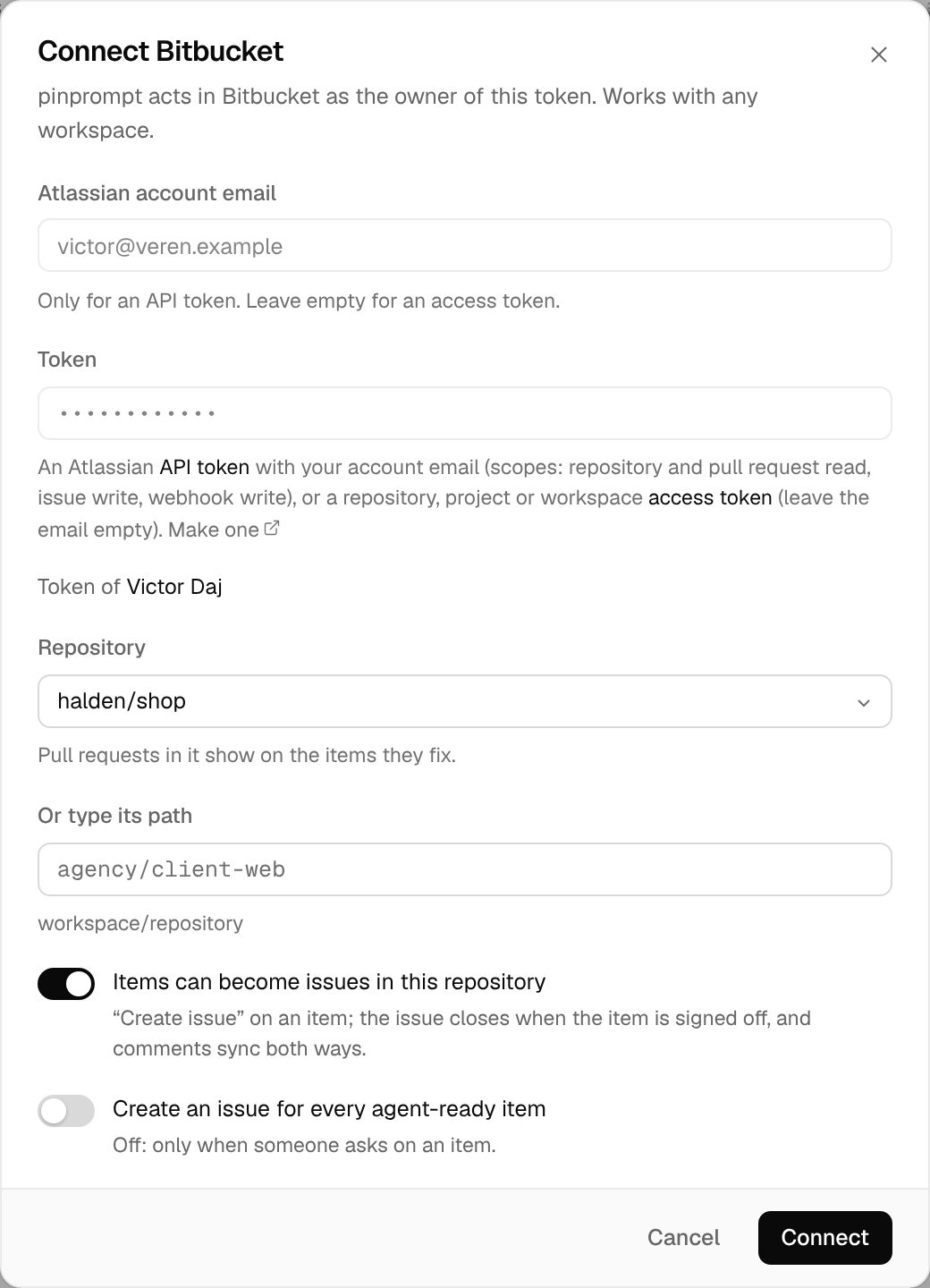
Owner or developer: Settings → Integrations → Connect Bitbucket. Paste the email (for an API token) and the token, then pick the repository or type its path. Turn on Items can become issues in this repository if the repository has its issue tracker on and you want issues there.
The connected card is the same as GitLab's: the repository, whose token it is, whether changes are coming back (with Try again when the webhook couldn't be created), and the switches. Change takes a new token, another repository, or issues on or off; the item links stay.
Pull requests
| Bitbucket | pinprompt |
|---|---|
A PR is created or updated whose title, description or source branch names an item key (FB-12) | Linked on the item as #5. When an agent or developer claimed the item, it is attached as their run and the item moves to To check. Unclaimed items only get the link and a note. A draft PR links but doesn't attach. |
| A build status on the PR's commit (Pipelines or any CI that reports to Bitbucket) | The PR's CI: failing if any failed or stopped, running if any is in progress, passing when all succeeded |
| A successful Vercel or Netlify status (or one named preview or deploy) with a preview URL | The fix's preview link |
| The PR is merged | A note "PR #5 was merged in Bitbucket"; an item still being fixed moves to To check (switch Merged PR). |
| The PR is declined | A note |
Link on an item takes a PR link; #5 means a PR when issues are off, and an issue when they are on (use the link then). Review agents find items by PR URL (items_for_pr).
Project brief: Draft from repo reads the repository's main branch when no other code host is connected.
Issues (optional)
The same as GitLab's: Create Bitbucket issue (a bug [FB-12] Title with the spec and a link back), Link an issue, spec updates, a comment and resolved on sign-off (wontfix for won't fix), comments both ways. A status change in Bitbucket (on hold, resolved, …) shows on the item's link; the item still waits for a person. Comments come back only from a private repository, and screenshots go only into a private repository's issues, as expiring links.
Security
- The token is stored encrypted with
PINPROMPT_SECRET_KEYand never shown again. - Webhook calls go to
<base>/api/hooks/bitbucket/<integration id>. Bitbucket signs each one with the secret pinprompt generated for this connection (X-Hub-Signature: sha256=…); anything else gets 401. Deliveries are replay-guarded and act only on the connected repository. - pinprompt only ever sends the token to
api.bitbucket.org, and follows result pages only there.
Disconnecting
Disconnect forgets the token. Issues and PRs stay in Bitbucket and items keep their links. Remove pinprompt's webhook in Repository settings → Webhooks; until then it gets 401.
Not built yet
- Bitbucket Data Center / Server (self-hosted).
- Claude fix rounds on Bitbucket. Fix rounds run only on GitHub.
- Labels on Bitbucket issues (Bitbucket issues have none; kind and priority go into the text).