For teams
Feedback without the extension Beta
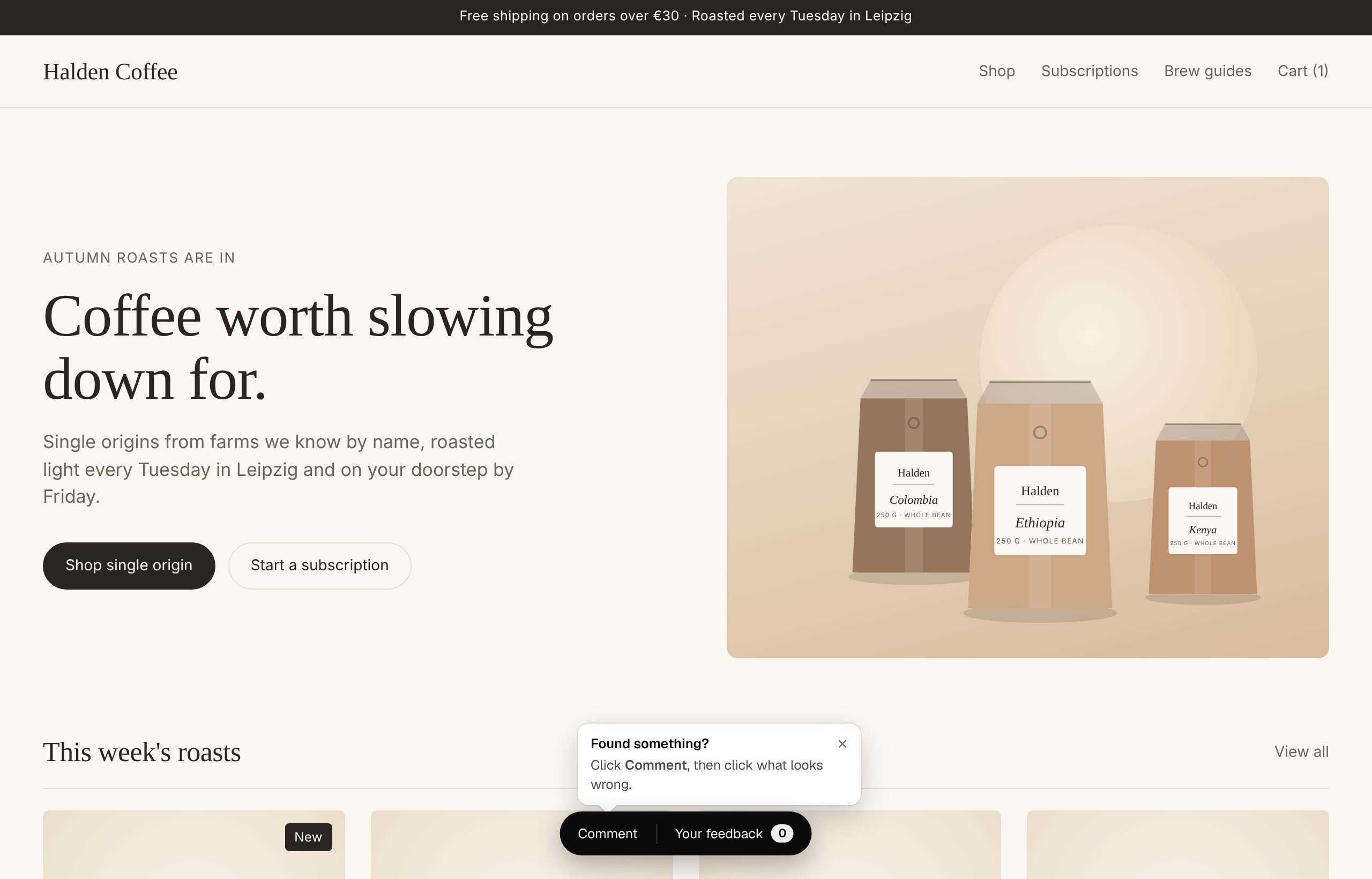
Clients open the site from pinprompt and get the feedback bar in any browser, nothing to install. One script line on the site, switched on per project.
The Chrome extension stays the best tool for your team. For clients, installing an extension is the biggest hurdle, and it leaves out Safari, Firefox and phones. With the review script on the site, a client clicks Open the site in pinprompt and the same feedback bar appears, in any modern browser.
Turn it on
- 1.In the project, open Settings → General and switch on Feedback without the extension in the Clients card. Save.
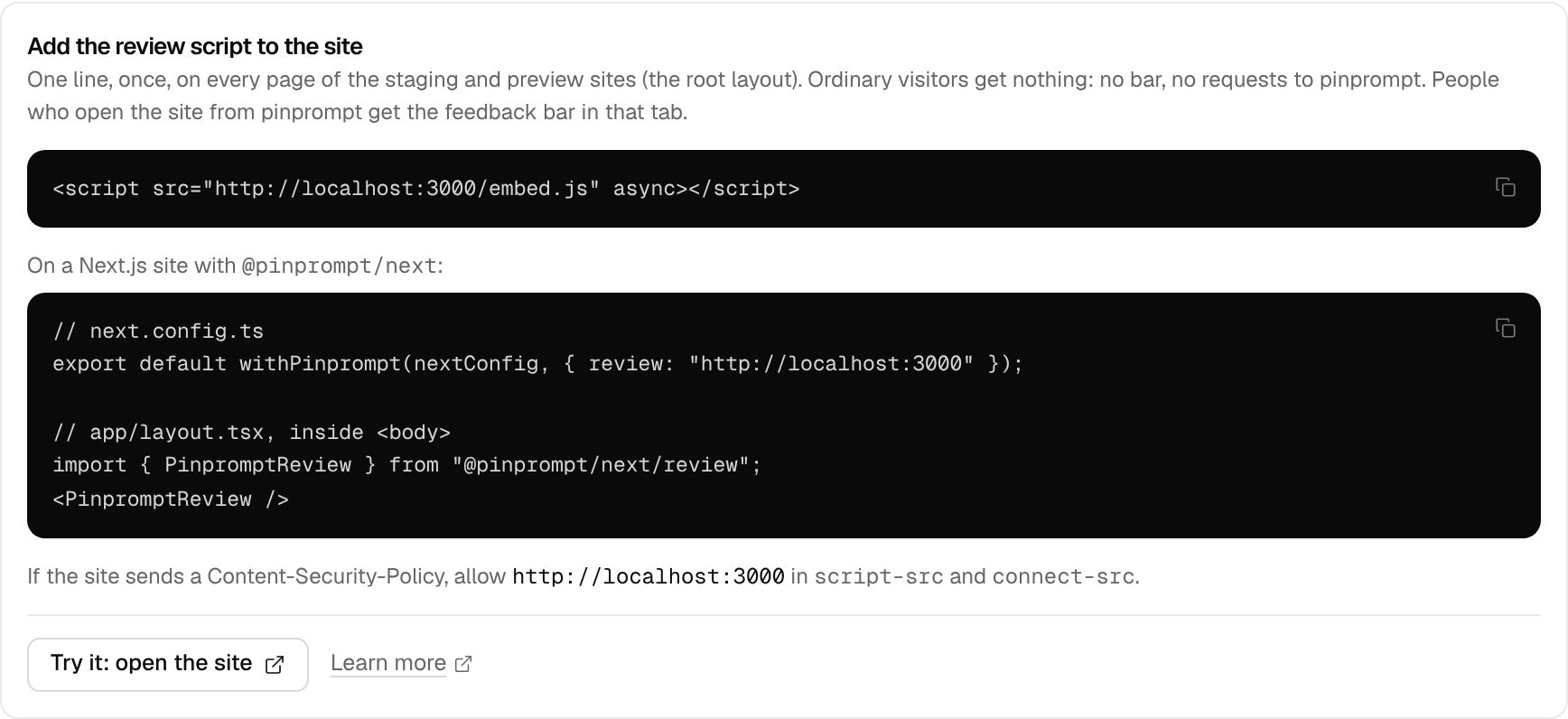
- 2.Add the line shown below the switch to the site, once, in the root layout of the staging and preview builds:
<script src="https://<your pinprompt>/embed.js" async></script>On a Next.js site with @pinprompt/next:
   // next.config.ts
   export default withPinprompt(nextConfig, { review: "https://<your pinprompt>" });

   // app/layout.tsx, inside <body>
   import { PinpromptReview } from "@pinprompt/next/review";
<PinpromptReview />- 1.Try it: open the site on the same settings card opens the site with the bar for you.
Clients who review in Sanity Studio's Presentation can get the same bar on its preview: Feedback in Sanity Presentation.
What clients see
Their invite email and their welcome on Your feedback drop the "add the feedback bar" step: two steps, Open the site and click Comment, then Check the fix. Open the site opens the site with the bar. They need nothing else. More: Invite a client.
If their review ends while they're writing (they opened the site again from pinprompt in another tab or on their phone, the 8 hours are up, or the laptop slept through a refresh), the bar stays with their note and says "Your review ended. Open the site again from pinprompt to send this." When they do, the note is back in the box on that page. Closing it removes the bar. Everything in When a question, a slow draft or Send gets in the way works here too.
How it stays private
- Ordinary visitors get nothing. Without a review link the script stops at once: no bar, no request to pinprompt, nothing added to the page.
- Only through pinprompt. Open the site makes a one-time code that works for 10 minutes and only on this project's own sites. The script trades it for a review sign-in that lives in that browser tab only.
- A review sign-in can only give feedback. It works for this one project, with a client's rights whatever the person's role (an owner who opens a review link gets the same), and only for what the feedback bar does: read the pins and your reports, send feedback with its screenshot, comment, answer and check a fix. It can't open settings, the team, integrations, other projects, tokens or MCP. Team members keep their full role in the app and the extension.
- Short-lived. A review sign-in lasts 2 hours and is renewed while the bar is open, never past 8 hours from the link. Opening a new review link for the project ends the earlier one. End review on the bar ends it at once, on the server too (use it on a shared computer); closing the tab lets it run out.
- The site's own scripts. The review sign-in sits in the tab's session storage, where any script on the page could read it. That is why it is limited as above. Checking where the code is used (the page's Origin) only stops other websites in a browser; it isn't what keeps the sign-in safe.
- The code never reaches the site's server. It travels after
#in the address, which browsers don't send, and the script removes it from the address bar right away. - Same toolbar as the extension. Masking, client mode and everything clients can and can't see work the same.
- Turning the switch off stops new sessions at once.
Script or extension: what differs
| Script | Extension | |
|---|---|---|
| Install | Nothing; any modern browser | Chrome or Edge, once |
| Screenshot | Drawn from the page. Very close, but images from other sites that don't allow it, videos and canvases can come out blank | The tab's exact pixels |
| Sensitive data | Masked the same way: emails, phones, cards, form values and anything marked are painted over before the screenshot is drawn (Sensitive data) | Same |
| Screen recording | Desktop browsers, after the browser asks to share the tab | Same |
| Console and network | From when the bar loads, not from the very start of the page | From the start |
| Where it works | Only sites that carry the line | Every site of the project |
| Site setup | The line; a site with a Content-Security-Policy must allow your pinprompt in script-src and connect-src | None |
Someone who has the extension and opens a review link gets one bar, not two.
Not yet
- Tested automatically in Chrome, in an iPhone-sized touch screen, and on the Safari engine (WebKit, desktop and iPhone profile) on every change. Not yet tried on a real iPhone or in Firefox; check one before a client relies on it.
- Beta: tested end to end, with little real use so far.
- Closing the tab without End review leaves the review sign-in working for up to 2 hours, in that tab's storage only.